Skip to content
  • Home
  • Cyber Map
  • About Us – Contact
  • Disclaimer
  • Terms and Rules
  • Privacy Policy
Cyber Web Spider Blog – News

Cyber Web Spider Blog – News

Globe Threat Map provides a real-time, interactive 3D visualization of global cyber threats. Monitor DDoS attacks, malware, and hacking attempts with geo-located arcs on a rotating globe. Stay informed with live logs and archive stats.

  • Home
  • Cyber Map
  • Cyber Security News
  • Security Week News
  • The Hacker News
  • How To?
  • Toggle search form
Windows 11 Enhances File Explorer with Speedy Menus

Windows 11 Enhances File Explorer with Speedy Menus

Posted on August 18, 2026 By CWS

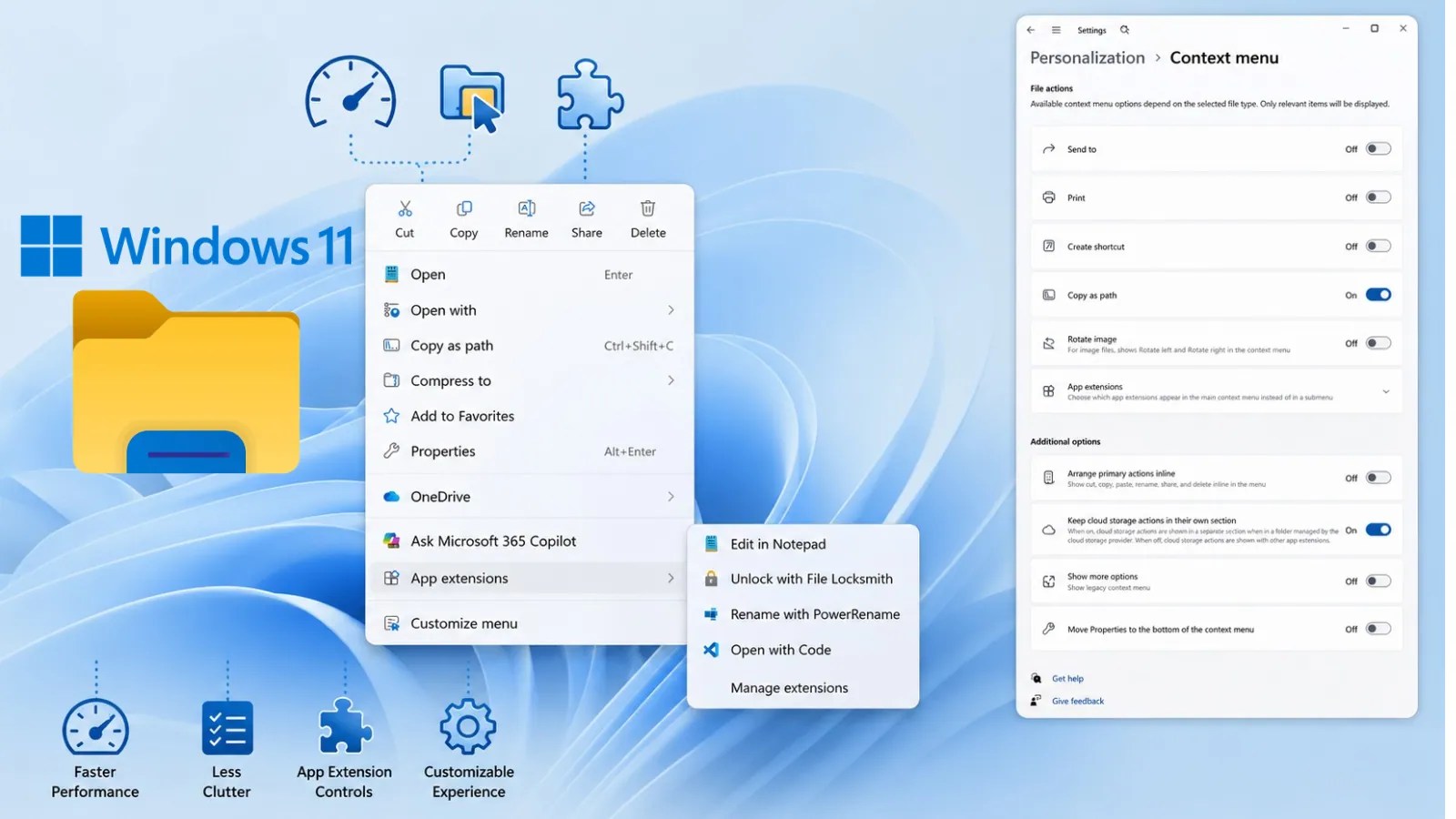
Microsoft has unveiled an updated File Explorer for Windows 11 Insiders, introducing a faster, more streamlined context menu. This enhancement aims to improve user interaction by boosting right-click performance and minimizing clutter, while also offering users greater control over both built-in commands and third-party app extensions.

Improved Responsiveness and Usability

This update is part of Microsoft’s broader initiative to enhance the responsiveness and stability of File Explorer, a core component of the Windows operating system. File Explorer is essential for daily tasks such as navigating directories, managing files, and accessing cloud-based content. Microsoft has concentrated on eliminating freezes, reducing loading times, and minimizing visual disruptions that hinder these common activities.

According to Microsoft, File Explorer now launches more swiftly and performs consistently during navigation and file operations. The company has addressed numerous potential issues that could lead to system stalls and delays, prioritizing a seamless user experience.

Redesigned Context Menu

The newly designed right-click menu is among the most significant changes in this update. Historically, context menus have been criticized for performance issues due to the accumulation of application extensions. As more software adds its actions, these menus can become overwhelmed and slow to load.

Microsoft’s new design reduces the number of default top-level options, maintaining access to commonly used actions. The restructured menu opens more quickly by doing less processing when users interact with files or folders. Users can further customize these options through the Settings app.

Customization and New Features

A new feature, the “Customize menu” option, allows users to personalize which Windows commands and app extensions appear in the context menu. This option can be accessed via the Context Menu page under the Personalization section in Settings.

Users can toggle built-in Windows commands and decide whether to display specific application extensions directly in the main menu or in a submenu. The redesign also allows users to revert to standard text entries for commands like Cut, Copy, and Paste, addressing familiar habits from Windows 10.

Additional improvements include expanded address bar input support and clearer file size units. The Details pane has also been reorganized for easier file property access. These updates are currently available to Windows Insiders, with Microsoft planning further refinements based on user feedback before a wider release.

As Microsoft continues to refine these changes, users can expect a more efficient and user-friendly File Explorer experience that aligns with modern computing needs.

Cyber Security News Tags:app extensions, context menu, File Explorer, Microsoft, right-click menu, software update, tech news, user interface, Windows 11, Windows Insiders

Post navigation

Previous Post: Heights Finance Data Breach Affects Over 1.2 Million

Related Posts

Cloud Atlas Hacker Group Exploiting Office Vulnerabilities to Execute Malicious Code Cloud Atlas Hacker Group Exploiting Office Vulnerabilities to Execute Malicious Code Cyber Security News
Fake Trading Platform Spreads Needle Stealer Malware Fake Trading Platform Spreads Needle Stealer Malware Cyber Security News
Multiple Gitlab Security Vulnerabilities Let Attackers Trigger DoS Condition Multiple Gitlab Security Vulnerabilities Let Attackers Trigger DoS Condition Cyber Security News
Critical Cisco ISE Vulnerability Allows Remote Attacker to Execute Commands as Root User Critical Cisco ISE Vulnerability Allows Remote Attacker to Execute Commands as Root User Cyber Security News
Microsoft Anti-Spam Bug Blocks Users From Opening URLs in Exchange Online and Teams Microsoft Anti-Spam Bug Blocks Users From Opening URLs in Exchange Online and Teams Cyber Security News
Windows 11 Enhances Taskbar and AI Features Windows 11 Enhances Taskbar and AI Features Cyber Security News

Categories

  • Cyber Security News
  • How To?
  • Security Week News
  • The Hacker News

Recent Posts

  • Windows 11 Enhances File Explorer with Speedy Menus
  • Heights Finance Data Breach Affects Over 1.2 Million
  • SafePal Data Breach Exposes 40,000 Customer Records
  • Urgent GitLab Security Update Fixes Critical GraphQL Flaw
  • GhostJacking AI Attacks and New Cyber Threats Unveiled

Pages

  • About Us – Contact
  • Disclaimer
  • Privacy Policy
  • Terms and Rules

Archives

  • August 2026
  • July 2026
  • June 2026
  • May 2026
  • April 2026
  • March 2026
  • February 2026
  • January 2026
  • December 2025
  • November 2025
  • October 2025
  • September 2025
  • August 2025
  • July 2025
  • June 2025
  • May 2025

Recent Posts

  • Windows 11 Enhances File Explorer with Speedy Menus
  • Heights Finance Data Breach Affects Over 1.2 Million
  • SafePal Data Breach Exposes 40,000 Customer Records
  • Urgent GitLab Security Update Fixes Critical GraphQL Flaw
  • GhostJacking AI Attacks and New Cyber Threats Unveiled

Pages

  • About Us – Contact
  • Disclaimer
  • Privacy Policy
  • Terms and Rules

Categories

  • Cyber Security News
  • How To?
  • Security Week News
  • The Hacker News

Copyright © 2026 Cyber Web Spider Blog – News.

Powered by PressBook Masonry Dark