Skip to content
  • Home
  • Cyber Map
  • About Us – Contact
  • Disclaimer
  • Terms and Rules
  • Privacy Policy
Cyber Web Spider Blog – News

Cyber Web Spider Blog – News

Globe Threat Map provides a real-time, interactive 3D visualization of global cyber threats. Monitor DDoS attacks, malware, and hacking attempts with geo-located arcs on a rotating globe. Stay informed with live logs and archive stats.

  • Home
  • Cyber Map
  • Cyber Security News
  • Security Week News
  • The Hacker News
  • How To?
  • Toggle search form
Windows 11 Weather App’s High RAM Usage Sparks Concern

Windows 11 Weather App’s High RAM Usage Sparks Concern

Posted on August 10, 2026 By CWS

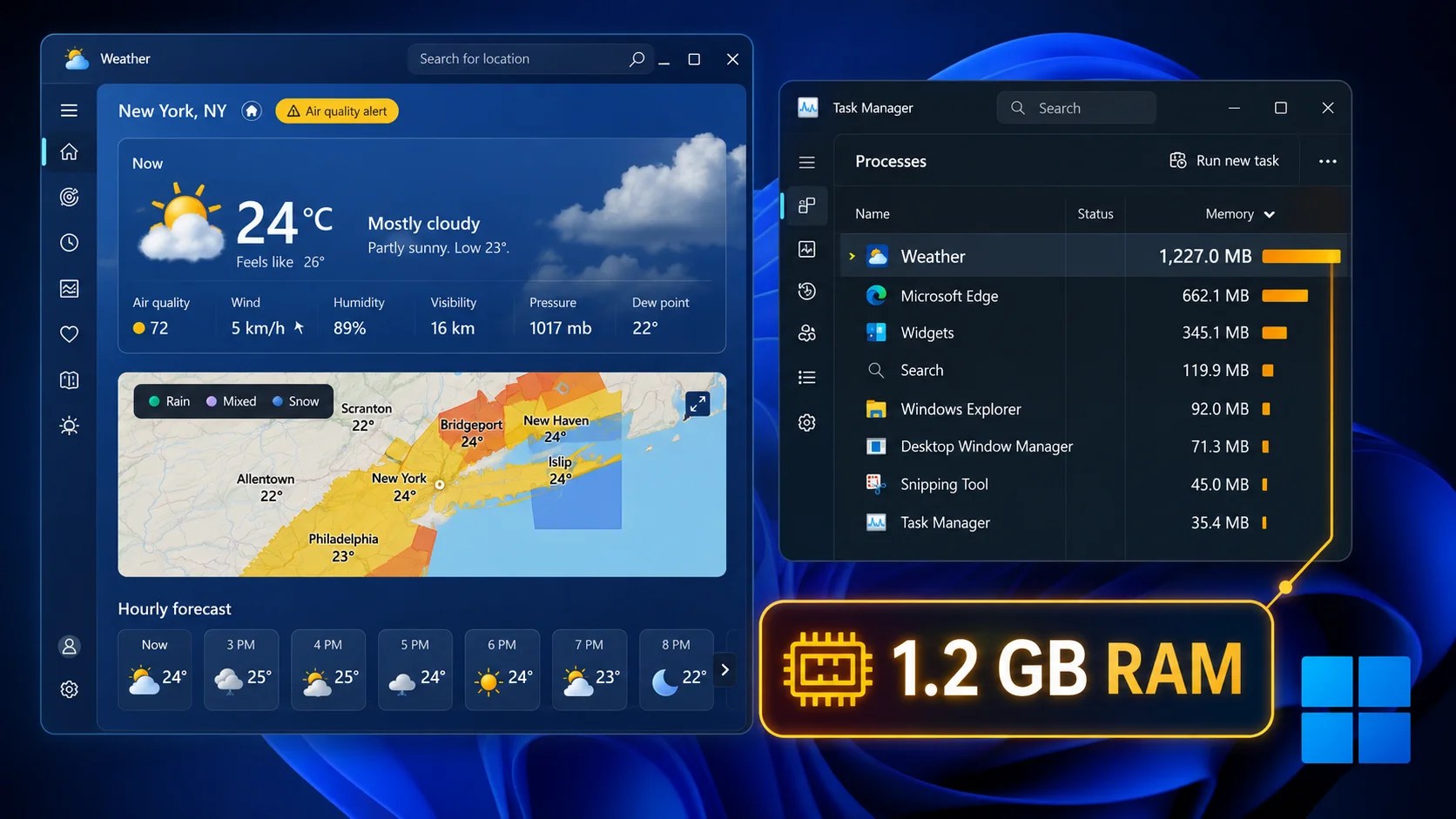
The built-in Weather app on Windows 11, regularly accessed via the taskbar, has come under scrutiny due to its excessive memory usage. Recent reports indicate that the app can consume over 1.2GB of RAM merely to display weather forecasts and maps.

Understanding the App’s High Memory Consumption

Initial reports from Windows Latest, supported by Wccftech and Notebookcheck, highlight a significant contradiction. Despite Microsoft’s assurances of enhanced memory efficiency with Windows 11, especially for 8GB systems, the Weather app appears to undermine these promises. The app is, in essence, MSN Weather repackaged within Microsoft’s WebView2 framework, which utilizes the Chromium engine, similar to Microsoft Edge.

When users examine the app’s process tree in Task Manager, they discover nine distinct Chromium-based sub-processes running concurrently. This extensive use of resources transforms a simple operation like checking the weather into a full-fledged browser session in the background.

Comparisons and Implications for Users

Windows Latest documented the app’s resource consumption as exceeding 1.2GB shortly after launching, even without intensive user interaction. Further testing showed memory usage stabilizing between 500-600MB when idle, spiking to 1.5GB when navigating maps or forecasts. Such resource demands are particularly concerning on 8GB systems, where the app can significantly hinder multitasking, especially on budget laptops prevalent in markets like India.

Comparisons with Apple’s macOS Weather app exacerbate the issue. Apple’s native application reportedly uses only 246.7MB of memory, roughly one-fifth of what Windows requires. Unlike the Windows app, Apple’s version is a fully native macOS application and is ad-free, contrasting with the ad-supported, resource-intensive Windows equivalent.

Microsoft’s Response and User Alternatives

Microsoft’s current situation is challenging, as the company has pledged to optimize Windows 11 for improved performance on devices with 8GB and 16GB of RAM through future updates. Reports suggest that Microsoft plans to transition the Weather app to a more native architecture, potentially by 2026, in a bid to enhance efficiency.

In the interim, users with limited hardware resources are advised to either disable the Weather widget within Windows 11 settings or uninstall it entirely. Many users have already switched to more lightweight weather apps available on the Microsoft Store to avoid the high memory overhead.

Until Microsoft provides a native solution, the Weather app serves as a reminder of how legacy web-wrapper designs can detract from an operating system’s performance objectives.

Cyber Security News Tags:8GB systems, Apple comparison, Chromium, macOS, memory efficiency, Microsoft, Microsoft Edge, native app, performance goals, RAM usage, Taskbar, Weather app, WebView2, Windows 11

Post navigation

Previous Post: Microsoft Introduces Security Detection Report in Teams
Next Post: Major Security Flaws Found in Belgium’s eID System

Related Posts

GhostSocks Malware Transforms Devices into Proxy Nodes GhostSocks Malware Transforms Devices into Proxy Nodes Cyber Security News
Threat Actors can Use Xanthorox AI Tool to Generate Different Malicious Code Based on Prompts Threat Actors can Use Xanthorox AI Tool to Generate Different Malicious Code Based on Prompts Cyber Security News
TELEPUZ Malware Tactics Exploit ClickFix for 36 Commands TELEPUZ Malware Tactics Exploit ClickFix for 36 Commands Cyber Security News
China-Linked Hackers Target Telecoms With New Malware China-Linked Hackers Target Telecoms With New Malware Cyber Security News
Fortinet Addresses Critical Vulnerabilities in Key Products Fortinet Addresses Critical Vulnerabilities in Key Products Cyber Security News
Microsoft Releases Emergency Patch For Windows Server Update Service RCE Vulnerability Microsoft Releases Emergency Patch For Windows Server Update Service RCE Vulnerability Cyber Security News

Categories

  • Cyber Security News
  • How To?
  • Security Week News
  • The Hacker News

Recent Posts

  • AI Agent Exploits Gym API in Australia’s First Cyberattack
  • Major Security Flaws Found in Belgium’s eID System
  • Windows 11 Weather App’s High RAM Usage Sparks Concern
  • Microsoft Introduces Security Detection Report in Teams
  • Critical Metabase Vulnerability Allows Admin Access

Pages

  • About Us – Contact
  • Disclaimer
  • Privacy Policy
  • Terms and Rules

Archives

  • August 2026
  • July 2026
  • June 2026
  • May 2026
  • April 2026
  • March 2026
  • February 2026
  • January 2026
  • December 2025
  • November 2025
  • October 2025
  • September 2025
  • August 2025
  • July 2025
  • June 2025
  • May 2025

Recent Posts

  • AI Agent Exploits Gym API in Australia’s First Cyberattack
  • Major Security Flaws Found in Belgium’s eID System
  • Windows 11 Weather App’s High RAM Usage Sparks Concern
  • Microsoft Introduces Security Detection Report in Teams
  • Critical Metabase Vulnerability Allows Admin Access

Pages

  • About Us – Contact
  • Disclaimer
  • Privacy Policy
  • Terms and Rules

Categories

  • Cyber Security News
  • How To?
  • Security Week News
  • The Hacker News

Copyright © 2026 Cyber Web Spider Blog – News.

Powered by PressBook Masonry Dark